Hola amigo! I'm excited that you are interested in contributing to ColdBox, CacheBox, LogBox, and/or WireBox. Before submitting your contribution, please make sure to take a moment and read through the following guidelines:
Code Of Conduct
This project is open source, and as such, the maintainers give their free time to build and maintain the source code held within. They make the code freely available in the hope that it will be of use to other developers and/or businesses. Please be considerate towards maintainers when raising issues or presenting pull requests. We all follow the Golden Rule: Do to others as you want them to do to you.
As contributors and maintainers of this project, we pledge to respect all people who contribute through reporting issues, posting feature requests, updating documentation, submitting pull requests or patches, and other activities.
Participants will be tolerant of opposing views.
Examples of unacceptable behavior by participants include the use of sexual language or imagery, derogatory comments or personal attacks, trolling, public or private harassment, insults, or other unprofessional conduct.
Bug Reporting
Each of the main standalone frameworks in ColdBox has separate locations for submitting bug reports. Please also ensure that if you submit a pull request, you link it to the appropriate issue.
ColdBox Core:
CacheBox :
LogBox :
If you file a bug report, your issue should contain a title, a clear description of the issue, a way to replicate the issue, and any support files we might need to replicate your issue. The goal of a bug report is to make it easy for yourself - and others - to replicate the bug and develop a fix for it. All issues that do not contain a way to replicate will not be addressed.
Support Questions
If you have questions about usage, professional support, or just ideas to bounce off the maintainers, please do not create an issue. Leverage our support channels first.
Ortus Community Discourse:
Box Slack Team:
Professional Support:
Pull Request Guidelines
The master branch is just a snapshot of the latest stable release. All development should be done in dedicated branches. Do not submit PRs against the master branch. They will be closed.
All pull requests should be sent against the development branch or the LTS version branch releases/v{version}
Security Vulnerabilities
If you discover a security vulnerability, please email the development team at and make sure you report it to the #security channel in our Box Team Slack Channel. All security vulnerabilities will be promptly addressed.
Development Setup
We have added all the necessary information to develop on ColdBox in our area and our so you can set up the database to test against.
Language Compatibility
Please make sure your code runs on the following Supported CFML Engines:
Lucee 5+
Adobe ColdFusion 2018+
Coding Styles & Formatting
We are big on coding styles and have included a .cfformat.json in the root of the project so that you can run the formatting tools and CommandBox scripts:
We recommend that anytime you hack on the core, you start the format watcher (box run-script format:watch). This will monitor your changes and auto-format your code for you.
You can also see the Ortus Coding Standards you must follow here: https://github.com/Ortus-Solutions/coding-standards.
CFC Docs With DocBox
All CFCs are self-documenting, and we leverage to document the entire software. All functions must be properly documented using the DocBox syntax: https://docbox.ortusbooks.com/getting-started/annotating-your-code
Financial Contributions
You can support ColdBox and all of our Open Source initiatives at Ortus Solutions by becoming a Patreon. You can also get lots of goodies and services depending on the level of contributions.
Contributors
Thank you to all the people who have already contributed to ColdBox! We: heart: : heart: : heart: love you!
Made with
Security Levels
ConsoleAppender
Property
The ConsoleAppender takes no additional properties.
This appender logs using Java's System.out.println function. Logs will appear in the directory specificied in your CF or Lucee Administrator.
Most applications require logging and tracing capabilities. One can usually use ColdFusion's standard cflog or cftrace tags but you can reach a limitation very fast.
What if you needed to log only certain severity levels for a particular CFC or piece of code?
What if you needed that severity to advise you via SMS or Twitter (yes Twitter)?
What if you wanted to turn it off easily or reconfigure your logging levels?
You would have to build all of these advising and logging capabilities yourself. Also, inserting log statements is tedious, time consuming and frequently pollutes your real code. You can understand the pain and complexity required to properly deal with these situations. These reasons (and more) are why the ColdBox team has invested in building LogBox.
What's New With 7.1.0
August 3, 2023
Minor release alongside the ColdBox platform.
TraceAppender
This appender directs messages via the cftrace tag. It has no configuration properties.
Layout
The layout component defines the format of the message to store in an appender repository. Be default, each appender already has a pre-defined message format. However, if you do not like the format of the message you can easily change it by creating your own layout component and registering it with the appender. You can do this in the configuration object when you add appenders:
Note: Not all appenders use a layout object (e.g. the DBAppender).
//add a FileAppender with my own formatting
props = { filePath='/logs', fileName='Test' };
config.appender(
    name='Fileapp',
    class="logbox.system.logging.appenders.FileAppender",
    properties=props,
    layout="model.logging.MyFileLayout"
);
So to create your very own layout object, you just need to extend the LogBox abstract layout object: logbox.system.logging.Layout and implement the format() method.
Project maintainers have the right and responsibility to remove, edit, or reject comments, commits, code, wiki edits, issues, and other contributions not aligned with this Code of Conduct. Project maintainers who do not follow the Code of Conduct may be removed from the project team.
When interpreting the words and actions of others, participants should always assume good intentions. Emotions cannot be derived from textual representations.
Instances of abusive, harassing, or otherwise unacceptable behavior may be reported by opening an issue or contacting one or more of the project maintainers.
LogBox is a standalone enterprise ColdFusion (CFML) logging and messaging library
LogBox Manual - Version 7.x
LogBox
LogBox is an enterprise ColdFusion (CFML) logging library designed to give you flexibility, simplicity, and power when logging or tracing is needed in your applications. LogBox is also part of the ColdBox Platform suite of services and libraries. It allows you to easily build upon it's logging framework to meet any logging or reporting needs your applications have. LogBox surpasses ColdFusion's very basic cflog tag. LogBox allows you to create multiple destinations for your loggings and even configure multiple destinations or change them at runtime.
Almost every application needs logging and/or tracing capabilities, and we have developed LogBox to satisfy these needs. Although you should not over-use logging as it can slow down an application, LogBox allows you to filter out or cancel logging noise.
LogBox is a standalone framework for ColdFusion (CFML) applications, and it is also bundled with the ColdBox Platform.
Versioning
LogBox is maintained under the guidelines as much as possible. Releases will be numbered in the following format:
And constructed with the following guidelines:
Breaking backward compatibility bumps the major (and resets the minor and patch)
New additions without breaking backward compatibility bumps the minor (and resets the patch)
Bug fixes and misc changes bump the patch
License
The ColdBox Platform, LogBox, is open source and licensed under the License.
Copyright by Ortus Solutions, Corp
ColdBox, CacheBox, Wirebox, and LogBox are registered trademarks of Ortus Solutions, Corp.
Discussion & Help
The LogBox help and discussion group can be found here:
Reporting a Bug
We all make mistakes from time to time :) So why not let us know about it and help us out? We also love pull requests, so please star us and fork us:
Jira Issue Tracking
Professional Open Source
ColdBox is a professional open source software backed by offering services like:
Custom Development
Professional Support & Mentoring
Training
Resources
Official Site:
CFCasts Video Training:
Source Code:
HONOR GOES TO GOD ABOVE ALL
Because of His grace, this project exists. If you don't like this, don't read it; it's not for you.
"Therefore being justified by **faith**, we have peace with God through our Lord Jesus Christ: By whom also we have access by **faith** into this **grace** wherein we stand, and rejoice in hope of the glory of God." Romans 5:5
What's New With 7.0.0
Discover the power of LogBox 7.0.0
You can read all about this release on our main What's New Page:
Release Notes
The full release notes per library can be found below. Just click on the library tab and explore their release notes:
What's New With 7.2.0
November 18, 2023
You can read all about this release on our main What's New Page:
Release Notes
The full release notes per library can be found below. Just click on the library tab and explore their release notes:
Features at a Glance
LogBox can handle the inserting of logging and/or tracing statements in your application with a simple to use API while providing you the ability to manage logging behavior outside of your application code.
You can configure LogBox via a programmatic configuration file (cfc)
LogBox
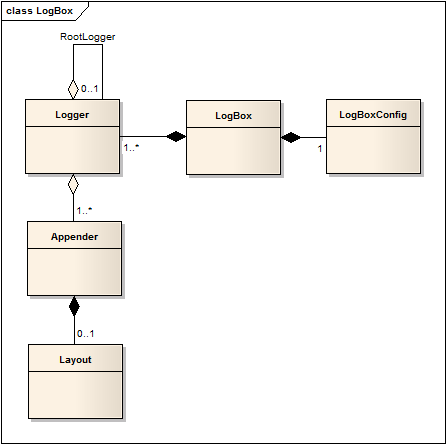
LogBox is the core framework you need to instantiate in order to work with logging in your application. You have to instantiate it with a LogBoxConfig object that will hold your logging configurations. After the library is instantiated and configured you can ask from it a named Logger object so you can start logging or tracing messages.
You have two ways to use LogBox:
Standalone Framework
How Does LogBox Work?
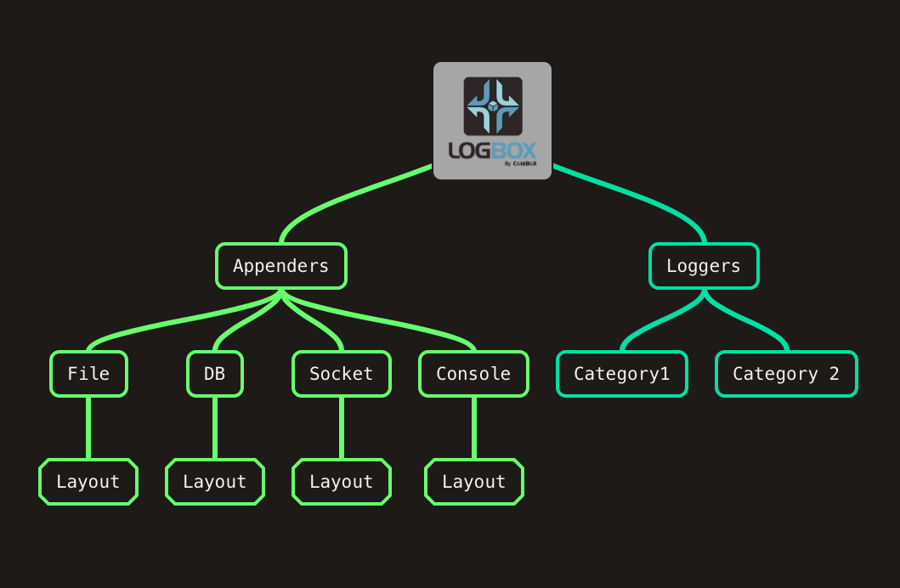
LogBox has five main components:
LogBox
The central library that stores your loggers, appenders, categories, and configuration
CFAppender
Using LogBox
Once you have created and configured the LogBox library, you can interact with it in order to get logger objects. The main methods you will use to interact with LogBox are the following, but I recommend you look at the CFC api () in order to get a listing of all available methods.
Upgrading to LogBox 7
The Official LogBox 7 Upgrade guide
ColdFusion 2016 Support Dropped
ColdFusion 2016 support has been dropped. Adobe doesn't support them anymore, so neither do we.
Adding Categories to Specific Logging Levels
The methods shown below are used to add categories to specific severity levels only. Each method can receive 1 to * category arguments.
public void debug()
public void info()
Benefits of using LogBox in a ColdBox application
Just by building a ColdBox application, you get several key benefits when dealing with LogBox.
First of all, the configuration, creation and instantiation is ALL done for you.
You can configure LogBox on a per-environment criteria as the ColdBox per-environment routines can use the LogBox configuration elements in its definitions.
Where is LogBox stored in a ColdBox app?
The LogBox instance is stored in the ColdBox main controller object (coldbox.system.web.Controller) and you can retrieve it like so from any handler, or interceptor.
Registering Appenders at Runtime
You can programmatically register appenders at runtime by using the registerAppender() function exposed in the LogBox object. Here is the function API:
Info Please note that registering dynamic appenders at runtime is tricky as some objecs might already have references to some appenders. We recommend registering appenders at configuration load or when the application starts up.
Instance Members
Every layout has access to the following public variables:
Dealing With Custom Layouts
In order for an appender to deal with custom layouts, you must use the layout methods when preparing to log your messages. Below is a simple example from the console appender of how to do this:
As you can see, all you need to do is have an if statement that checks whether the appender has a custom layout or not and then assign the return of the layout as your message to log.
# Format everything
box run-script format

# Start a watcher, type away, save and auto-format for you
box run-script format:watch
The two most important methods are getRootLogger() & getLogger(), which you will use to get the root or named logger objects.
Caution: When you ask for a named category logger and LogBox cannot find its definition, it will create a logger that will inherit its logging levels and appenders from the root logger.
Method
Description
LogBoxConfig getConfig()
Get the config object registered
Logger getLogger(any category)
Get a named logger object using a category string or the object you will log from
The class in charge of sending messages to the appropriate destinations according to the category it has been defined with.
Categories
Each Logger is created with a unique category that usually maps to the classpath of the CFC that uses the logger.
Appenders
Components that receive log events and send them for storage in their implementations: files, consoles, etc.
Layouts
The appenders will send the messages to their destinations using a specified format. This is called the layout of the message. LogBox comes with default layouts, but you can build your own.
These components work in unison to deliver messages' logging and tracing and control how they are logged. You will primarily interact with the Logger component as it will send your statements to the Appenders you have configured. Users can extend LogBox and build custom appenders and layouts.
LogBox from the ColdBox Proxy
The ColdBox Proxy (coldbox.system.remote.ColdboxProxy) object also has three utility methods you can use to talk to LogBox from any remote proxy you create:
getLogBox() : Get a reference to the LogBox instance.
getRootLogger() : Get a reference to the root logger.
getLogger(category:any) : Get a named logger instance or reference.
Appender's name
The name of the file to log to if using file as the logType. If not set, it will use the appender's name
This appender logs directly to the cflog tag by using a custom file or logging to the application logs.
Property
Type
Required
Default
Description
logType
string(file or application)
false
file
The type of cflog to use: file or application.
fileName
string
false
logBox = getController().getLogBox();
// or
logBox
Every ColdBox application can use LogBox by default since the main engine already uses it. By default ANY ColdBox application will be configured with a LogBox instance with the following appenders:
Also, the app will log on ANY severity by default up to INFO for the root logger and the ColdBox package. You can customize this default behavior by creating or modifying the LogBox element in your ColdBox configuration file and follow the same configuration approach as any normal LogBox configuration file.
Creating a Custom Layout
You can easily create a custom layout object by creating a cfc that extends our abstract layout object: logbox.system.logging.Layout and implementing a format() method. Below you can see the method signature:
<!--- format --->
<cffunction name="format" output="false" access="public" returntype="string" hint="Format a logging event message into your own format">
    <cfargument name="logEvent" type="logbox.system.logging.LogEvent" required="true" hint="The logging event to use to create a message.">
</cffunction>
All you need to do is inspect the logging event and create your very own message and then return it back. That's it! You thought there was more?
To configure LogBox to use your custom layout object, set the layout key in your LogBox configuration with the dotted component path to your custom layout object. See Appenders in the Configuration section
Within a ColdBox application
If you have downloaded LogBox as a standalone framework, then the initial namespace for the core is logbox.system. This allows you to use logbox as a standalone framework that is integrated into your proprietary application.
The ColdBox Framework already has an instance of LogBox created for you in every application and it is stored in the main application controller: controller.getLogBox(). The namespace within the ColdBox framework is coldbox.system.
// Simple Config
config = new logbox.system.logging.config.LogBoxConfig();
// Create logbox instance
logBox = new logbox.system.logging.LogBox( config );
LogBox categorizes your logging and/or tracing statements according to user-defined categories that can be configured at runtime or pre-runtime. All of these categorizations can have their own logging level ranges (such as debug or info) and even their own destination points or what we refer to as LogBox Appenders (such as Console).
LogBox Appenders are the destination points you configure for your logging and/or tracing statements. LogBox also offers a basic extensible API so you can build and extend upon the Appender framework according to your unique logging or tracing needs. This gives you complete control and flexibility of how to expand LogBox without reinventing the wheel. Some appenders included in LogBox can log to the following destinations: File, Database, Sockets, Email, ColdFusion logging, System Console, and much more.
LogBox facilitates the creation of your very own customized message formats via Layouts. You can create a Layout component that can be configured in to ANY LogBox appender so it can spit out your very own customized messages.
LogBox can be instantiated as many times as you want and used as many times as you like in a single application. There are no restrictions upon its usage.
LogBox allows for category inheritance according to component and package conventions.
About This Book
Learn more about open source!
The source code for this book is hosted in GitHub: https://github.com/ortus-docs/logbox-docs. You can freely contribute to it and submit pull requests. The contents of this book is copyrighted by Ortus Solutions, Corp and cannot be altered or reproduced without author's consent. All content is provided "As-Is" and can be freely distributed.
The majority of code examples in this book are done in cfscript.
The majority of code generation and running of examples are done via CommandBox: The ColdFusion (CFML) CLI, Package Manager, REPL -
All ColdFusion examples designed to run on the open source Lucee Platform or Adobe ColdFusion 11+
External Trademarks & Copyrights
Flash, Flex, ColdFusion, and Adobe are registered trademarks and copyrights of Adobe Systems, Inc.
Notice of Liability
The information in this book is distributed “as is”, without warranty. The author and Ortus Solutions, Corp shall not have any liability to any person or entity with respect to loss or damage caused or alleged to be caused directly or indirectly by the content of this training book, software and resources described in it.
Contributing
We highly encourage contribution to this book and our open source software. The source code for this book can be found in our where you can submit pull requests.
Charitable Proceeds
10% of the proceeds of this book will go to charity to support orphaned kids in El Salvador - . So please donate and purchase the printed version of this book, every book sold can help a child for almost 2 months.
Shalom Children's Home
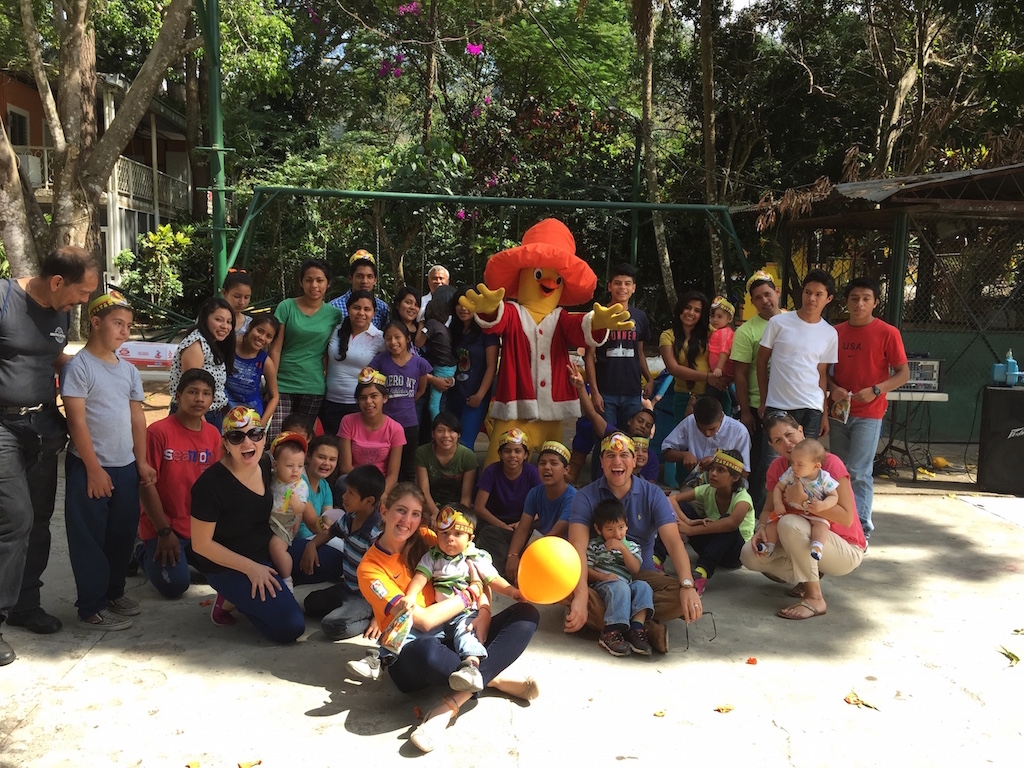
Shalom Children’s Home () is one of the ministries that is dear to our hearts located in El Salvador. During the 12 year civil war that ended in 1990, many children were left orphaned or abandoned by parents who fled El Salvador. The Benners saw the need to help these children and received 13 children in 1982. Little by little, more children came on their own, churches and the government brought children to them for care, and the Shalom Children’s Home was founded.
Shalom now cares for over 80 children in El Salvador, from newborns to 18 years old. They receive shelter, clothing, food, medical care, education and life skills training in a Christian environment. The home is supported by a child sponsorship program.
We have personally supported Shalom for over 6 years now; it is a place of blessing for many children in El Salvador that either have no families or have been abandoned. This is good earth to seed and plant.
Release History
All the major information about WireBox Releases
Versioning Schema
Wirebox is maintained under the guidelines as much as possible. Releases will be numbered in the following format:
And constructed with the following guidelines:
Adding Categories Granularly
You can also add categories with very granular information using the category() method. This method will allow you to add a category definition with a range of severity levels and even a list of which appenders to respond to.
Parameters:
ExtraInfo Serialization
When using any of the logging methods like info(), debug(), warn(), etc, they all take two arguments:
The message to log as a string or a closure that returns the message
RollingFileAppender
ScopeAppender
Installation
LogBox can be downloaded as a standalone framework or included with the latest ColdBox Platform release. The main difference between both versions is the instantiation and usage namespace; the rest is the same.
The best way to install LogBox is by using CommandBox CLI and package manager.
SocketAppender
LogBox Refcard
Our LogBox RefCard will get you up and running in no time
<major>.<minor>.<patch>
Name of the Appender
The name of the file, if not defined, then it will use the name of this appender. Do not append an extension to it. We will append a .log to it
fileEncoding
string
false
utf-8
The file encoding to use, by default we use UTF-8
autoExpand
boolean
false
true
Whether to expand the file path or not. Defaults to true
fileMaxSize
int
false
2000 (2MB)
The max file size for log files. Defaults to 2000 (2 MB)
fileMaxArchives
int
false
2
The max number of archives to keep. Defaults to 2
Info Please remember to set the autoExpand property to FALSE if you will be using an absolute file path location.
Property
Type
Required
Default
Description
filePath
string
true
---
The location of where to store the log file
filename
string
false
appender's name
The key to use in the scope
limit
numeric
false
0
a limit to the amount of logs to rotate. Defaults to 0, unlimited (optional)
Property
Type
Required
Default
Description
scope
string
false
request
The scope to persist to, any valid CF scope.
key
string
false
---
The port to connect to
timeout
numeric
false
5
the timeout in seconds. defaults to 5 seconds
persistConnection
boolean
false
true
Whether to persist the connection or create a new one every log time. Defaults to true
Property
Type
Requierd
Default
Description
host
string
true
The host to connect to
port
string
true
Appender Properties
As we mentioned before, LogBox ships with over 10 different appenders for your logging and tracing needs. Some of them require configuration properties and some don't. We already discovered that when we configure an appender we can pass in a structure of properties much like how we configure ColdBox Interceptors. Each appender can implement as many properties as they see fit. We will digest all the included LogBox appenders and their configuration properties.
Async Property
All appenders have an async boolean property by default inherited from LogBox. This will tell LogBox to log asynchronously in a separate thread. By default all logging is done synchronously
A unique name for the category to register. Only unique names can be registered per instance.
levelMin
The default min log level for this category. (OPTIONAL. Defaults to 0 [FATAL].)
levelMax
The max default log level for this category. (OPTIONAL. Defaults to 4 [DEBUG].)
appenders
A list of appender names to configure this category with else it will use all the appenders in the root logger. You can also use * to add all registered apenders. (OPTIONAL)
Example
Name
Description
name
An extraInfoargument, which can be anything you like.
This extrainfo argument can be a simple value, a CFC, a complex object, or anything you like. The appenders get this extraInfo argument and process it into their appropriate destinations by serializing its value. This is done by using the following algorithm:
If it is a simple value, then use it.
If it is an object, then check if the object has a method called $toString(). If the method exists, then call $toString() and use its return value.
If it's an exception, marshall it to JSON
If it is an object with no $toString() method, marshall its representation into XML format.
If it is a complex variable like a struct, query, array, etc., then marshall it into JSON format.
$toString() Convention
As you can see from the algorithm above, you can use the extraInfo argument to your benefit to save serialized data representations to the appenders and then retrieve or re-inflate them later. The $toString() convention is great because you can control how a CFC will serialize to its string representation. Let's see an example of a simple CFC:
So when this object is sent to a logger's method, it will detect it is an object, and the $toString() function exists and call it for serialization.
System Requirements
ColdFusion 2018+
Lucee 5+
ColdBox Installation
If you are using LogBox within a ColdBox application context, then LogBox is part of the platform. Just configure it via the config/LogBox.cfc and you are ready to roll.
Standalone Installation
You can leverage CommandBox to install the standalone version of LogBox
Mappings
You will need the following mappings that all point to the folder you installed logbox into:
This will ensure that the appropriate libraries can find each other.
Remember that this only applies to the standalone approach.
If you can run the following snippet, then LogBox is installed correctly:
//log all email service messages to the MyLogFileAppender and the Console.
config.category( name="org.model.EmailService", appenders="MyLogFileAppender,Console" );
// User.cfc
component{

    function $toString(){
        // return my representation as a comma list of values of my properties
        return "#getName()#,#getAge()#,#getEmail()#";
    }
}
user = userService.getUser( rc.id );

// need to log it.
if( log.canDebug() ){
    log.debug( "User just got logged in right now!", user );
}
Breaking backward compatibility bumps the major (and resets the minor and patch)
New additions without breaking backward compatibility bump the minor (and reset the patch)
Bug fixes and misc changes bump the patch
LTS - Support Policy
Updates are provided for 12 months for all releases, and security fixes are provided for two years after the next major release.
Version
Release
Updates
Security Fixes
6.x
2022
2023
2025
7.x
2023
2024
2026
8.x
Releases
In this section, you will find the release notes for each version we release under this major version. If you are looking for the release notes of previous major versions, use the version switcher at the top left of this documentation book. Here is a breakdown of our major version releases.
Luis Majano is a Computer Engineer, published author, founder, and CEO of Ortus Solutions, Corp (www.ortussolutions.com), a consulting firm specializing in open-sourcing tooling, web development, architecture, and professional open-source.
He has been designing and working with software architecture and technologies since the year 2000. He has a passion for learning and mentoring developers so they can succeed with sustainable software practices and the usage and development of open-source software.
He is the creator of ColdBox HMVC, ContentBox Modular CMS, TestBox BDD, CommandBox CLI, and over 200 open-source projects. He speaks regularly at several international conferences, and you can read his blog at .
Luis is passionate about Jesus, tennis, golf, volleyball, and anything electronic. Random Author Facts:
He played volleyball in the Salvadorean National Team at the tender age of 17
The Lord of the Rings and The Hobbit is something he reads every 5 years. (Geek!)
His first computer was a Texas Instrument TI-99/4A that his parents gave him in 1986. After some time digesting his very first BASIC book, he had written his own tic-tac-toe game at the age of 9. (Extra geek!)
Keep Jesus number one in your life and in your heart. I did and it changed my life from desolation, defeat and failure to an abundant life full of love, thankfulness, joy and overwhelming peace. As this world breathes failure and fear upon any life, Jesus brings power, love and a sound mind to everybody!
“Trust in the LORD with all your heart, and do not lean on your own understanding.” – Proverbs 3:5
Contributors
Jorge Emilio Reyes Bendeck
Jorge is an Industrial and Systems Engineer born in El Salvador. After finishing his Bachelor studies at the Monterrey Institute of Technology and Higher Education , Mexico, he went back to his home country, where he worked as the COO of. In 2012 he left El Salvador and moved to Switzerland in pursuit of the love of his life. He married her and today he resides in Basel with his lovely wife Marta and their daughter Sofía.
Jorge started working as a project manager and business developer at Ortus Solutions, Corp. in 2013, At Ortus, he fell in love with software development and now enjoys taking part in software development projects and software documentation! He is a fellow Christian who loves to play the guitar, worship, and rejoice in the Lord!
Therefore, if anyone is in Christ, the new creation has come: The old has gone, the new is here!
2 Corinthians 5:17
Brad Wood
Brad grew up in southern Missouri, where he systematically disassembled every toy he ever owned, which occasionally led to unintentional shock therapy (TVs hold charge long after they've been unplugged, you know). After high school, he majored in Computer Science with a music minor at (Olathe, KS). Today he lives in Kansas City with his wife and three girls, where he still disassembles most of his belongings (including automobiles) with a slightly higher success rate of putting them back together again.) Brad enjoys church, international food, and the great outdoors.
Brad has been programming CFML for 12+ years and has used every version of CF since 4.5. He first fell in love with ColdFusion as a way to easily connect a database to his website for dynamic pages. Brad blogs at () and likes to work on solder-at-home digital and analog circuits with his daughter and build projects with Arduino-based microcontrollers.
Brad's CommandBox Snake high score is 141.
Configuration Within ColdBox
ColdBox allows for a programmatic approach via the ColdBox.cfc configuration object. So let's look at how the ColdBox loader looks at your configuration:
Is there a logBox variable defined in the configuration?
False:
Does a LogBox.cfc exist in the application's config folder?
True: Use that CFC by convention to configure LogBox
True:
Have you defined a configFile key?
True: Then use that value to pass into the configuration object so it can load LogBox using that configuration file (CFC)
So the configuration DSL is exactly the same as you have seen in before with the only distinction that you can add a configFile key that can point to an external configuration file (CFC).
The LogBox Injection DSL
WireBox DI and Injection can talk to LogBox. This way you can easily use our dependency injection DSL for LogBox related objects:
Type
Description
logbox
Get a reference to the application's LogBox instance
logbox:root
Get a reference to the root logger
logbox:logger:category
Get a reference to a named logger by its category name
Below you can see the most common usage of this dependency DSL:
Configuring LogBox
LogBox comes pre-configured for operation with very basic logging. However, you can customize it to your fancy using different configuration strategies using the programmatic configuration object or the .
When you are in a ColdBox application, you will have a logbox structure in your ColdBox.cfc already that you can use, or you can create a portable CFC as well and place it in config/LogBox.cfc
Using a Logger Object
Once you retrieve a logger object from LogBox, you are ready to start sending messages. We already covered how to dynamically add/remove/list/check appenders from a logger, so let's look at the other methods we have available:
Instance Members
Every logger has access to the following public variables:
When To Log
We recommend using the available can{severity}() methods or a closure message approach to determine if we can log at a specific log level before writing the logging method line. This is done as best practice to avoid processing messages that will never be logged anyway.
Less Performant
So let's look at a very simple example of what NOT to do:
FileAppender
Configuring The Root Logger
Configuring a root logger is mandatory for LogBox. This is very easy and just a few arguments.
Parameters
<major>.<minor>.<patch>
False: Continue to next point
Configure LogBox with default framework settings (coldbox.system.web.config.LogBox)
False: The configuration data is going to be defined inline here so process it
Every Appender has access to the following public variables:
Property
Description
this.logLevels
A reference to the logbox.system.logging.LogLevels class.
Name of the Appender
The name of the file, if not defined, then it will use the name of this appender. Do not append an extension to it. We will append a .log to it
fileEncoding
string
false
utf-8
The file encoding to use, by default we use UTF-8
autoExpand
boolean
false
true
Whether to expand the file path or not. Defaults to true
Info Please remember to set the autoExpand property to FALSE if you will be using an absolute file path location.
Property
Type
Required
Default
Description
filePath
string
true
---
The location of where to store the log file
filename
string
false
logbox:logger:{this}
Get a reference to a named logger according to the current class path of the injected target
//  LogBox wired in
property name="logBox" inject="logbox";

//  Root Logger
property name="logger" inject="logbox:root";

//  Named Category
property name="logger" inject="logbox:logger:com.api.model";

//  Category eq to ClassPath
property name="logger" inject="logbox:logger:{this}";
The cool thing about this LogBox DSL is that it is the same whether you are using LogBox in ColdBox applications or any other framework or non-framework ColdFusion application.
Configuration can be done in the following ways:
No configuration: Uses the default configuration shown below
Portable CFC: Creating a portable data CFC using the LogBox DSL in a configure() method
LogBoxConfig: Creating the LogBoxConfig object and interacting with its methods programmatically
LogBox DSL Struct: Passing a struct literal into LogBox, using the LogBox DSL.
1. Default Configuration
This is the default configuration when LogBox is created with no config:
2. Portable CFC
You can create a CFC with a single configure method with the LogBox configuration in a variable called logbox using the LogBox DSL.
A reference to the logbox.system.logging.LogLevels class.
Utility Methods
Method
Description
boolean canLog(numeric level)
Checks if this logger can log a certain type of severity. There is also a can{severity}() method for each severity level.
boolean can{severity}()
Checks if this logger can log a certain type of severity.
void setCategory(category)
Set the category name.
Logger getRootLogger()
Get the root logger.
numeric getLevelMin()
Get the minimum severity level.
Logging Methods
Method
Description
fatal(string message, [any extraInfo=""])
Log a fatal message.
error(string message, [any extraInfo=""])
Log an error message.
warn(string message, [any extraInfo=""])
Log a warning message.
info(string message, [any extraInfo=""])
Log an information message.
debug(string message, [any extraInfo=""])
Log a debug message.
As you can probably tell, all logging methods take in a message string an a second argument called extraInfo. This extraInfo argument can be anything from a string, a structure, a query or whatever. This way you can send in a complex structure that the appenders will serialize into message form or log into the appropriate channel. Thus, extraInfo can be very handy when you are building your own custom appenders.
I hope that by now you understand the basics of loggers and how easy it is to use them.
Property
Description
DBAppender
Property
Type
Required
Default
Description
dsn
string
true
---
The dsn to use for logging
table
The columns needed or created in the table are
id : UUID
severity : string
category : string
If you are building a column mapper, the map must have the above keys in it that match to your own table columns.
Helper Methods
The abstract appender also has various cool methods that you can use when building appenders:
Properties Methods
Method
Description
struct getProperties()
Utility Methods
Layout Methods
Adding Appenders
The first thing you need to do in your config object is add appenders. Each appender is added via the appender() method.
An appender is an object that LogBox uses to log statements to a destination repository. All appenders act as destinations that can include: databases, JMS, files, consoles, sockets, etc. The appender has the responsibility of taking the logged message and persisting the message or sending the message to an external service. LogBox comes bundled with the following appenders that can be found in the package coldbox.system.logging.appenders:
EmailAppender
Dynamic Appenders
Each logger object has several methods that you can use in order to interact with the logger's appenders. You can add, remove, clear or list the appenders on a specific logger instance. Below are the methods you can use in the logger class to interact with appenders:
// setting some messages
myLogger = logBox.getLogger( this ); // "com.model.dao"

myLogger.info( "I just created my first logger" );

try{
    data = dao.getDBData();
}
catch( any e ){
    myLogger.error(
        "Something really died on my dbdata method: #e.message# #e.detail#",
        e.tagContext
    );
}
if true, then we will create the table. Defaults to false (Optional)
rotate
boolean
false
true
If true, delete records older than rotationDays. Defaults to true (Optional)
rotationDays
integer
false
30
If rotate is true, delete records older than rotationDays. Defaults to 30 (Optional)
Get the entire properties struct.
void setProperties(struct properties)
Override all properties with a new properties struct.
any getProperty(string property)
Get a property.
void setProperty(string property, any value)
Set a property.
boolean propertyExists(string property)
Checks if a property exists.
Method
Description
boolean isInitialized()
Returns true if the appender has been initialized.
string getName()
Get the name of the appender
string getHash()
Get the appender's unique hash id
string severityToString(numeric severity)
Transforms a severity integer to it's human readable form
Method
Description
any getCustomLayout()
Get the custom layout object if defined.
boolean hasCustomLayout()
Checks if the custom layout object is defined in this appender.
---
The from email address
to
string
true
---
The to email(s)
cc
string
false
empty
The cc email(s)
bcc
string
false
empty
The bcc email(s)
mailserver
string
false
empty
The optional mail server
mailusername
string
false
empty
The optional mail username
mailpassword
string
false
empty
The optional mail password
mailport
int
false
25
The optional mail port
useTLS
boolean
false
false
Use the Transport level security setting in the cfmail tag.
useSSL
boolean
false
false
Use SSL or not
Property
Type
Required
Default
Description
subject
string
true
---
Get's pre-pended with the severity and category field.
from
string
true
name
A unique name for the appender to register. Only unique names can be registered per instance.
class
The appender's class to register. We will create, init it and register it for you.
properties
The structure of properties to configure this appender with. (OPTIONAL)
layout
The layout class path to use in this appender for custom message rendering. (OPTIONAL)
levelMin
The numerical or English word of the minimal logging level (OPTIONAL, defaults to 0 [FATAL].)
levelMax
The numerical or English word of the maximum logging level (OPTIONAL, defaults to 4 [DEBUG].)
Will deliver messages to a database table. It can auto create the table for you.
DummyAppender
An endless void of nothingness
EmailAppender
Will deliver messages to any email address.
FileAppender
Will deliver messages a file.
RollingFileAppender
A file appender that can do file rotation and archiving.
ScopeAppender
Will deliver messages to any ColdFusion variable scope.
SocketAppender
Will connect to any server socket and deliver messages.
TracerAppender
Will deliver messages to the ColdFusion tag cftrace.
Asynchronous Appenders
You may wish your logs to be asynchronous. You can do so by passing an async property in your configuration. ( This happens at the logger level and is available to all appenders out of the box, even ones that you create yourself!
Configuration
You can configure LogBox to use one or all of these appenders at any point in time. You can even register as many instances of any appender by defining a unique name for each. Here are examples of how one can configure appenders programmatically or via the simple configuration CFC:
Programmatic Approach
Configuration CFC approach
Another feature of a LogBox appender is that you can extend them or create new ones simply by leveraging the LogBox API. To customize LogBox appenders for your own unique needs you would simply extend the core appender class: coldbox.system.logging.AbstractAppender and implementing the init() and logMessage() methods. Extending LogBox will be reviewed in greater detail over the next few sections.
Appender
Description
CFAppender
Will deliver messages to the coldfusion logs.
ConsoleAppender
Will deliver messages to the server's console via system.out
DBAppender
getAppender(name)
Appender
Return a named appender if it is registered in the logger
appenderExists(name)
Boolean
Checks if a named appender exists in the logger
addAppender(Appender)
void
Register an appender with the logger at runtime
removeAppender(name)
Boolean
Will un-register an appender from this logger
removeAllAppenders()
void
Will try to un-register all appenders from this logger
So you can easily add/remove/check the appenders on any logger at any time.
Method
Return Type
Description
hasAppenders()
Boolean
Checks if the logger has any appenders attached to it
//Add your own appender at runtime
jms = createObject( "component", "com.appender.JMSAppender" ).init( "JMSAppender", properties );
logger.addAppender( jms );

//log a message to all appenders and to my jms appender:
logger.fatal( "I FAILED MAN!" );

//remove it
logger.removeAppender( "JMSAppender" );
Creating Custom Appenders
In order to create your own appenders, you will have to create a cfc that extends logbox.system.logging.AbstractAppender and implement the following methods:
onUnRegistration()
An interceptor that fires when the appender is removed from a logger.
init()
The signature of the init method is the following:
As you can see each appender receives a name, a structure of properties, an optional layout class, and an optional levelMin and levelMax severity levels. The properties and layout are both optional, but you must call the super.init( argumentCollection = arguments ) method in order to have full ok operation on the appender. You can then do your own constructor as you see fit. Here is an example:
logMessage()
The signature of the logMessage method is the following:
As you can see it is a very simple method that receives a LogBox logging event object. This object keeps track of the following properties with its appropriate getters and setters:
timestamp
category
message
severity
extraInfo
You can then use this logging event object to log to whatever destination you want. Here is a snippet from our scope appender:
onRegistration() & onUnregistration()
Finally, both the onRegistration and onUnregistration methods have to be void methods with no arguments.
These are great for starting or stopping your appenders if they so need to. Here is a sample from our socket appender:
Method
Description
init()
Your constructor. Make sure to call super.init( argumentCollection=arguments );
logMessage()
The method that is called when a message is received.
onRegistration()
An interceptor that fires when the appender gets created and initialized. It can be used for preparing the appender for operation.
<---  Init --->
<cffunction name="init" access="public" returntype="AbstractAppender" hint="Constructor called by a Concrete Appender" output="false" >
    <---  ************************************************************* --->
    <cfargument name="name"         type="string"  required="true" hint="The unique name for this appender."/>
    <cfargument name="properties"     type="struct"  required="false" default="#structnew()#" hint="A map of configuration properties for the appender"/>
    <cfargument name="layout"         type="string"  required="false" default="" hint="The layout class to use in this appender for custom message rendering."/>
    <cfargument name="levelMin"      type="numeric" required="false" default="0" hint="The default log level for this appender, by default it is 0. Optional. ex: LogBox.logLevels.WARN"/>
    <cfargument name="levelMax"      type="numeric" required="false" default="4" hint="The default log level for this appender, by default it is 5. Optional. ex: LogBox.logLevels.WARN"/>
    <---  ************************************************************* --->

</cffunction>
<---  Constructor --->
<cffunction name="init" access="public" returntype="FileAppender" hint="Constructor" output="false">
    <---************************************************************** --->
    <cfargument name="name"         type="string"  required="true" hint="The unique name for this appender."/>
    <cfargument name="properties"     type="struct"  required="false" default="#structnew()#" hint="A map of configuration properties for the appender"/>
    <cfargument name="layout"     type="string"  required="true"  default="" hint="The layout class to use in this appender for custom message rendering."/>
    <cfargument name="levelMin"      type="numeric" required="false" default="0" hint="The default log level for this appender, by default it is 0. Optional. ex: LogBox.logLevels.WARN"/>
    <cfargument name="levelMax"      type="numeric" required="false" default="4" hint="The default log level for this appender, by default it is 5. Optional. ex: LogBox.logLevels.WARN"/>
        <---************************************************************** --->
    <cfscript>
        super.init(argumentCollection=arguments);

        // Setup Properties
        if( NOT propertyExists("filepath") ){
            $throw(message="Filepath property not defined",type="FileAppender.PropertyNotFound");
        }
        if( NOT propertyExists("autoExpand") ){
            setProperty("autoExpand",true);
        }
        if( NOT propertyExists("filename") ){
            setProperty("filename",getName());
        }
        if( NOT propertyExists("fileEncoding") ){
            setProperty("fileEncoding","UTF-8");
        }

        // Setup the log file full path
        instance.logFullpath = getProperty("filePath");
        // Clean ending slash
        if( right(instance.logFullpath,1) eq "/" OR right(instance.logFullPath,1) eq "\"){
            instance.logFullPath = left(instance.logFullpath, len(instance.logFullPath)-1);
        }
        instance.logFullPath = instance.logFullpath & "/" & getProperty("filename") & ".log";

        // Do we expand the path?
        if( getProperty("autoExpand") ){
            instance.logFullPath = expandPath(instance.logFullpath);
        }

        //lock information
        instance.lockName = getname() & "logOperation";
        instance.lockTimeout = 25;

        return this;
    </cfscript>
</cffunction>
<---  Log Message --->
<cffunction name="logMessage" access="public" output="true" returntype="void" hint="Write an entry into the appender.">
    <---************************************************************** --->
    <cfargument name="logEvent" type="logbox.system.logging.LogEvent" required="true" hint="The logging event"/>
    <---************************************************************** --->
    <cfscript>
        var logStack = "";
        var entry = structnew();
        var limit = getProperty('limit');
        var loge = arguments.logEvent;

        // Verify storage
        ensureStorage();

        // Check Limits
        logStack = getStorage();

        if( limit GT 0 and arrayLen(logStack) GTE limit ){
            // pop one out, the oldest
            arrayDeleteAt(logStack,1);
        }

        // Log Away
        entry.id = createUUID();
        entry.logDate = loge.getTimeStamp();
        entry.appenderName = getName();
        entry.severity = severityToString(loge.getseverity());
        entry.message = loge.getMessage();
        entry.extraInfo = loge.getextraInfo();
        entry.category = loge.getCategory();

        // Save Storage
        arrayAppend(logStack, entry);
        saveStorage(logStack);
    </cfscript>
</cffunction>
<cffunction name="onRegistration" access="public" hint="Runs after the appender has been created and registered. Implemented by Concrete appender" output="false" returntype="void">
</cffunction>

<cffunction name="onUnRegistration" access="public" hint="Runs before the appender is unregistered from LogBox. Implemented by Concrete appender" output="false" returntype="void">
</cffunction>
As we have seen the LogBox DSL can be used in different contexts:
Portable CFC with a configure() method in a logbox variable
ColdBox config inside the configure() method in a logbox variable
A struct literal sent in to the constructor of LogBox
NO matter how you dice it, it's the same LogBox Config DSL:
Base Config
Root level configuration keys.
Appenders
To define an appender you must define a struct with a key value which is the internal name of the appender. Each appender's name must be unique. You configure each appender with the following keys:
Key
Description
Root Logger
To configure the root logger, use the following keys:
Categories
To define categories, you define a struct with a key value, which is the internal name of the category. Each category name must be unique,. You configure each category with the following keys:
As you might notice, the names of the keys on all the structures match 100% to the programmatic methods you can also use to configure logBox. So, when in doubt, refer back to the argument names.
Example Configuration
An array that will hold all the category names to place under the ERROR logging level (OPTIONAL)
FATAL
An array that will hold all the category names to place under the FATAL logging level (OPTIONAL)
OFF
An array that will hold all the category names to not log at all (OPTIONAL)
Key
Description
appenders
A structure where you will define appenders
root
A structure where you will configure the root logger
categories
A structure where you can define granular categories (OPTIONAL)
DEBUG
An array that will hold all the category names to place under the DEBUG logging level (OPTIONAL)
INFO
An array that will hold all the category names to place under the INFO logging level (OPTIONAL)
WARN
An array that will hold all the category names to place under the WARN logging level (OPTIONAL)
class
The class path of the appender
properties
The properties struct for the appender (OPTIONAL)
layout
The layout class path of the layout object to use (OPTIONAL)
levelMin
The numerical or English word of the minimal logging level (OPTIONAL, defaults to 0 [FATAL])
levelMax
The numerical or English word of the maximum logging level (OPTIONAL, defaults to 4 [DEBUG])
Key
Description
levelMin
The numerical or English word of the minimal logging level (OPTIONAL, defaults to 0 [FATAL])
levelMax
The numerical or English word of the maximum logging level (OPTIONAL, defaults to 4 [DEBUG])
appenders
A string list of the appenders to use for logging or the * convention for all appenders.
exclude
A string list of appenders to exclude from logging.
Key
Description
levelMin
The numerical or English word of the minimal logging level (OPTIONAL, defaults to 0 [FATAL])
levelMax
The numerical or English word of the maximum logging level (OPTIONAL, defaults to 4 [DEBUG])
appenders
A string list of the appenders to use for logging (OPTIONAL, defaults to *)
exclude
A string list of appenders to exclude from logging.
ERROR
**
* A LogBox configuration data object
*/
component{

    function configure(){
        logBox = {

            appenders : {},

            root : {},

            categories : {},

            fatal : [],
            error : [],
            warn  : [],
            info  : [],
            debug : [],
            off   : []

        };
    }
}
We have a convention for our category names where each category name uses dot-notation according to the components path. Using a class-path convention for our category names allows one to pseudo-inherit for logging levels and appenders! The following example should help clarify this concept.
The overall premise is that when you request a logger with a category name LogBox will search for it's configuration. If LogBox does not find a configuration for the category name it will try to locate its closest ancestor for logging levels and appenders. If LogBox cannot find an ancestor the message will be logged using the root logger information. For example, let's say we define some appenders like this:
And some categories like this:
Then, let's say we request the following logger objects and logged some info:
Information
All example code snippets are using a
getLogger( "categoryname" )
call instead of our preferred approach of
getLogger( this )
because we want to showcase which category we are talking about. Please take this into consideration.
Category
Configured Levels
Assigned Levels
Appenders
root
FATAL-DEBUG
FATAL-DEBUG
console,file
coldbox.system
INFO-DEBUG
INFO-DEBUG
console
coldbox.system.plugins
Since we requested the category: coldbox.system.plugins.BeanFactory, LogBox tries to locate it, but it has not been defined, so it takes off the last item in the category name. Now it will search for a category of: coldbox.system.plugins via pseudo-inheritance. However, now coldbox.system.plugins has been found and it has been configured to only listen to error messages. Therefore, the coldbox.system.plugins.BeanFactory logger can ONLY log error messages according to it's inherited category. So the info() message will be ignored, and the error() message will be sent to both the FileAppender and the ConsoleAppender!
The second logger is called coldbox.system.interceptors.SES, LogBox tries to match a category but fails, so it now searches for a logger called coldbox.system.interceptors. It still cannot find it so it continues up the package chain and finds the coldbox.system logger which has been set with a minimum of INFO level and ONLY the console appender. So the messages that get logged is the logger.info() and the logger.debug() message and they will be sent to the console appender.
These examples should give you insight into category inheritance and the power they provide. You can easily turn toggle logging for entire packages with a single category definition. However, this is great only if you follow the dot notation conventions. Below is a sample generic chart sample: